
Article summary: Boss, let’s not talk nonsense today, let’s talk about the thing that makes you and me sleep uneasy at night – how the core code was quietly “smoothly” taken away. I have been in this business for decades and have seen a lot. Some employees resigned, and as soon as the USB flash drive was inserted, half of the company was destroyed.
Boss, let’s not talk nonsense today, let’s talk about the thing that makes you and me sleep uneasy at night – how the core code was quietly “smoothly” gone.
I have been in this business for decades and have seen a lot. Some employees resigned, and as soon as the USB flash drive was inserted, half of the company's life was gone. ; Some partners asked for a demo version, but they were given away root and branch. You invested millions in research and development, and finally made wedding dresses for others. Today we are not going to talk about the concept of futility, but we will talk about how to "lock" the document with real swords and guns.
Lock up the core code! These 4 hard-core encryption tricks make leaks impossible
1. Deploy the Insight Eye MIT system
When it comes to insuring corporate code, the most reliable way is to lay a dragnet within the company. People who work in this industry have a strong sense of security, and to deal with internal leaks, they have to rely on professional systems. When it comes to "Anti-Leakage" in the circle, eight out of ten people would recommend this, if for no other reason than because it takes the word "control" to the extreme.
Source code level transparent encryption
It doesn’t matter what editor employees use, whether they write Java, Python or C++, as soon as the file is saved, it will be automatically encrypted in the background. When employees open it on their own computers, it looks the same as usual. Once copied to a USB flash drive or sent to personal WeChat, it becomes a mess of garbled characters. I have seen a company that does autonomous driving. A resigned employee wanted to copy away the entire algorithm model. As a result, the compressed package he took out was all encrypted shells after being decompressed. When the personnel talked to him, he didn't even have room for quibbles.Outgoing file life and death permissions
The core code needs to be shown to customers and tested, but are you afraid that it will be resold to competitors? This system allows you to send files that can only be opened a few times on a designated computer, and can even restrict "read-only", "disable printing", and "disable screenshots". It will be automatically destroyed upon expiration, and anyone who wants to watch it a third time has to apply again. This means that the initiative is always in your own hands.Leak traces "digging three feet into the ground"”
Who touched which file? Are you packing secretly at three o'clock in the morning, or are you trying to change the suffix to get away with it? This system can record operation logs for you down to the millisecond level. In the past, dealing with leaks was all about guessing, but now we can directly call up the video playback. One client relied on this to uncover the "ghost" who had been lurking for three years - the guy thought that he would be fine if he deleted the record, but it turned out that the system had already sent the screenshot to the boss's mailbox.Port control blocks all exits
Regardless of whether it is Bluetooth, USB, network disk or printing port, the administrator can block it for you with one click on the backend. If an employee is eager to use a USB flash drive, he has to go through the approval process, and during the approval process he can see what documents he wants to copy. If you want to copy a script, the administrator will look at the file name and reject it directly. This is like building a dam without leaving a mouse hole.Watermark password deterrence
The system automatically generates a "digital watermark" invisible to the naked eye on the screen. If anyone takes a photo of the screen and leaks it, if the photo is analyzed, the employee's name, job number, and even operating time will be revealed. This is called "If you stretch out your hand, you will be caught." Who dares to think wrongly?
2. BitLocker encryption that comes with the operating system
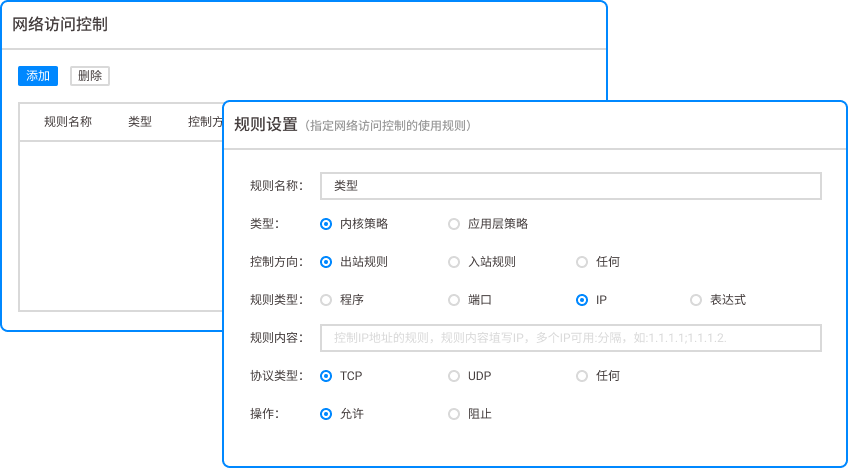
This is Microsoft's own feature, which is equivalent to putting a big lock on the entire hard drive. If the computer is lost or the hard drive is removed, the other party will never be able to read the data without the password. The operation is also simple, just right-click the hard drive, open BitLocker, and set a password. But there is a trouble. This lock locks the entire disk. This method will not work if colleagues need to access the code remotely, or if you have to send some files to the outsourced team. It can only prevent hardware loss, but cannot prevent insiders from actively leaking secrets.
3. Add a “hard” password to the document compression package
Everyone knows this method, package the code into RAR or ZIP, set a more complex password (such as uppercase and lowercase plus special symbols), and send it to the other party via WeChat or email. It sounds simple, but what are the hidden dangers? Password transmission itself is the biggest vulnerability. You send a file to Xiao Wang and the password to his WeChat account. What if his WeChat account is hacked? Or did he store the password and the file together for convenience? I once saw a boss who compressed the core code and set the password to the company name plus 123. However, the resigned employee solved the problem after a few casual attempts. That scene made me cry without tears.
4. Document encryption that comes with Office

If it is a code snippet in Word, Excel or PPT, it is very convenient to use Microsoft's own function to add an "open password". But the problem is also obvious: Too easy to crack . Just search for any Office password cracking software on the market, and it will take just a matter of minutes to brute force a pure numeric password. Moreover, this function does not work at all on the .java and .py source code files written by our programmers, and the scope of application is too narrow.
After working for so many years, I often tell my bosses: Encryption is not about buying a lock and hanging it on the door, but about assigning a personal bodyguard to each asset. If you choose the wrong tool, the little cost you save will eventually turn into huge compensation after the leak.
Source of this article: Enterprise Data Security and Internal Control Management Research Institute
Leading expert: Chen Zhenguo
Editor in charge: Liu Minhua
Last updated: March 25, 2026


 Insight Eye MIT System


 Hebei Public Network Security No. 13019902001038
