
Article summary: How to monitor LAN in real time? This question is asked by people almost every day - especially business managers and IT operations and maintenance. It is really an unavoidable problem. Unfamiliar devices quietly surf the Internet, a colleague downloads a high-definition blockbuster, pushing the bandwidth to the red line, and...
How to monitor LAN in real time? This question is asked by people almost every day - especially business managers and IT operations and maintenance. It is really an unavoidable problem. Strange devices quietly surf the Internet, a colleague downloads a high-definition blockbuster to push the bandwidth to the red line, and someone privately transfers sensitive documents on the LAN... These small and seemingly inconspicuous actions often slow down the business at critical moments and even plant security mines. I want to achieve "dynamic control and timely warning", but which step is more appropriate?
Don’t worry, we have gone through five methods that are commonly used and effective in actual testing. They include system-level solutions, traffic analysis, device access, and behavioral audits. They can basically meet the pain points of most enterprises, stabilize efficiency, and maintain the bottom line of security.
By the way, the capabilities mentioned below must be enabled under the premise of compliance authorization.

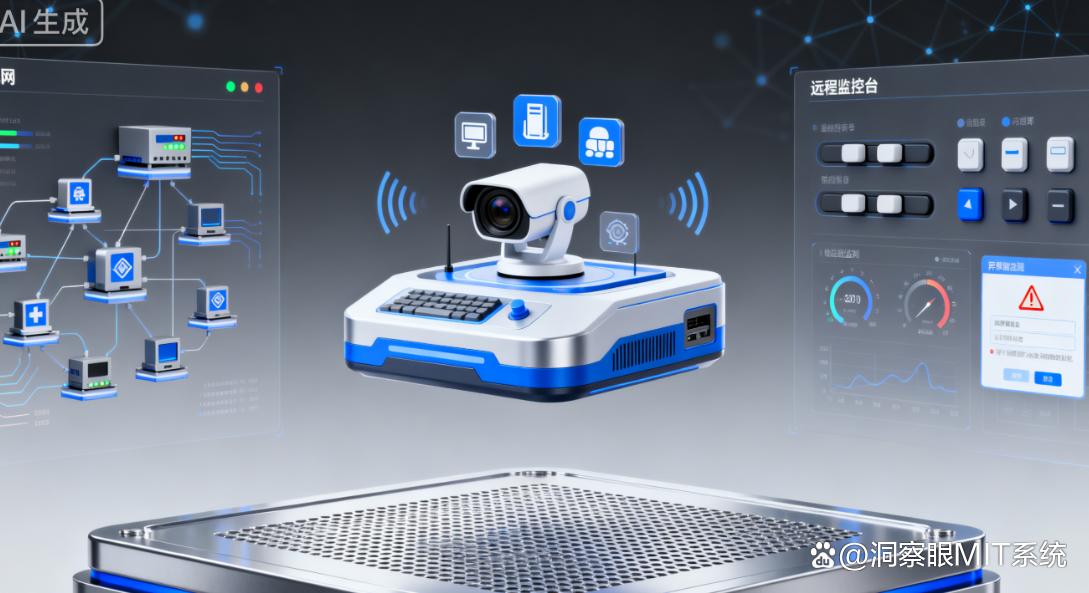
Method 1: Deploy the Insight MIT system
Core functions
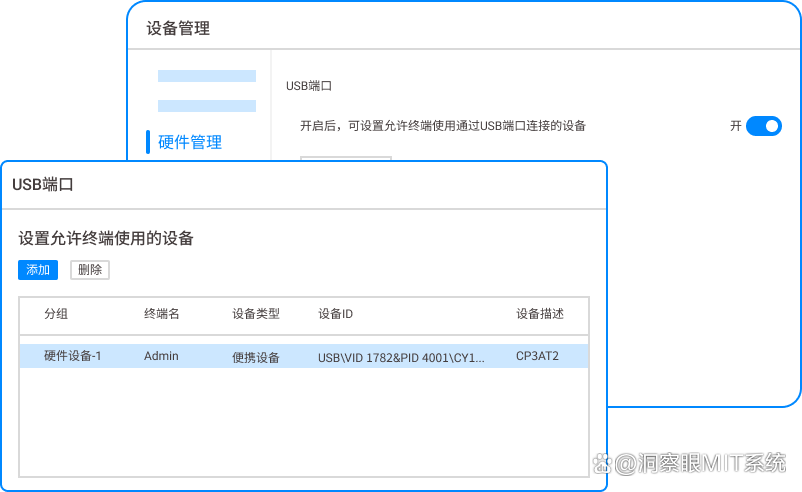
Real-time device management: Automatically discover LAN online terminals, the name, IP, MAC, and device type (computer/mobile phone/printer) are clear at a glance, and the online/offline status is refreshed in minutes; Once a strange device probes in, the system will immediately pop up a reminder - I have seen colleagues bring home routers to expand Wi-Fi, but they were blocked immediately, saving a lot of troubleshooting later.
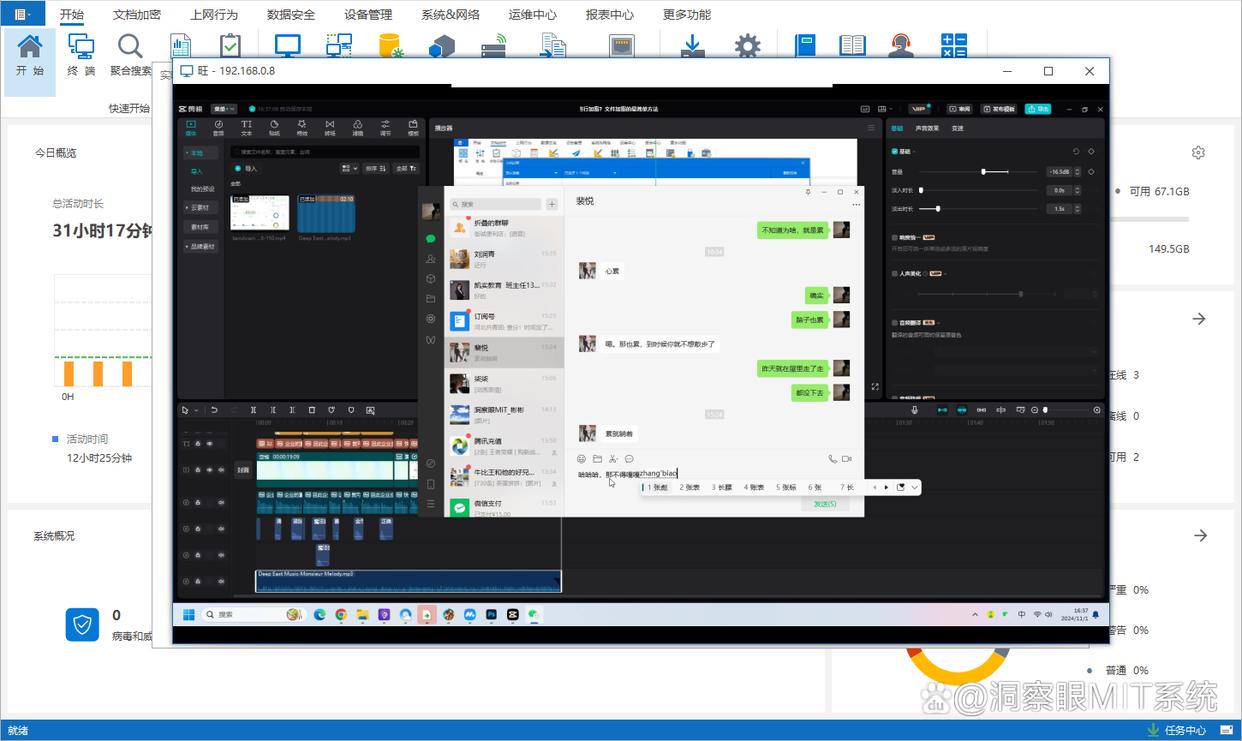
Real-time screen monitoring: Supports simultaneous viewing of single/multiple screens, document operations, web browsing, and application switching can all be presented without obvious delay; “"Multi-screen wall" is like a duty center, pulling the on-site status into one surface. When you are busy, you can glance at it and basically know who is doing what (this is especially useful during the newcomer training week).

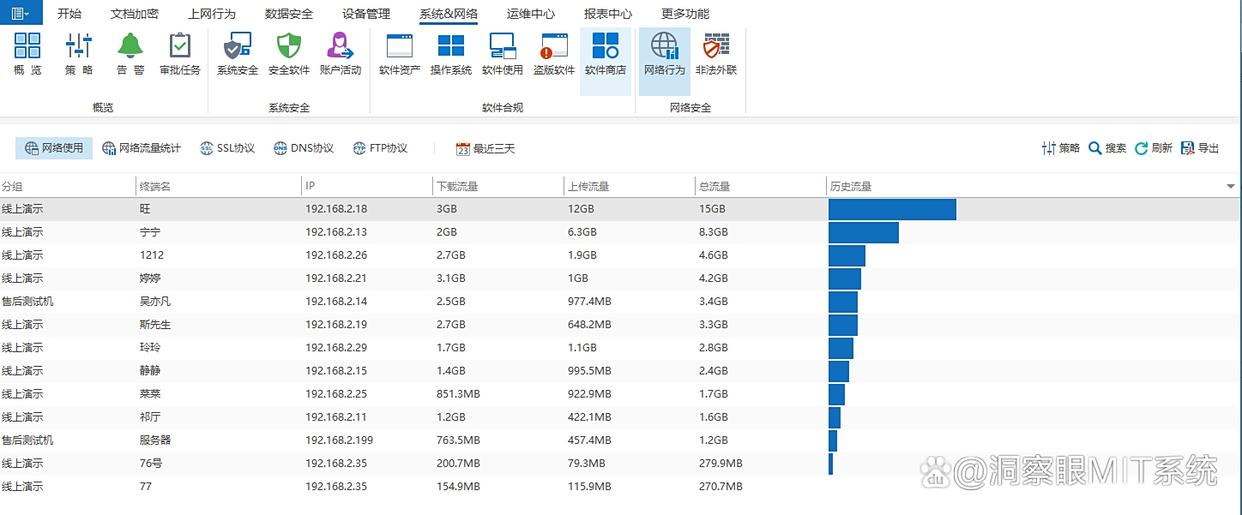
Real-time traffic control: Statistics of upstream/downstream traffic of each device, graphically displaying scene changes; You can set a threshold (for example, a single machine cannot download more than 15GB in a single day), and automatically limit the speed or prompt when exceeding the limit to avoid "when someone updates, everyone will be stuck and doubt their life."
Communication monitoring: Under the premise of legality, authorization, and compliance, common communication tools such as WeChat, QQ, Enterprise WeChat, and DingTalk can be monitored, and chat times, objects, and sent files and pictures can be recorded.
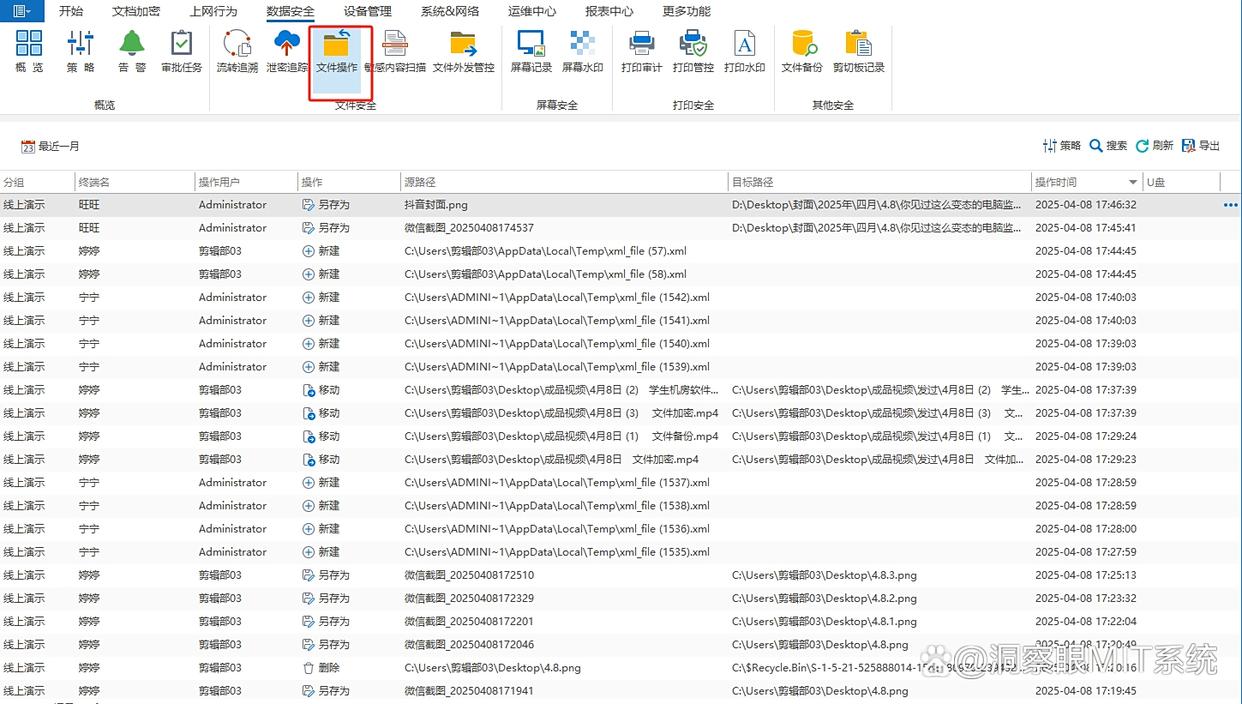
Document operation monitoring: record the creation, modification, copying, deletion and other operations of documents, and set permission policies; Once an abnormality occurs, such as batch modification of files by an off-duty account in the middle of the night, the system can give clues, and tracing the source no longer relies on "guessing."
Application scenarios
It is suitable for medium and large enterprises, R&D teams, financial and audit sensitive departments, etc., which have integrated requirements for "monitoring + early warning + management and control".; Personally, I think it is more like a "master control umbrella" that brings core data protection and network operations to the same table.
Method 2: Use network traffic analysis tools to achieve real-time traffic monitoring
Core functions
Full-link traffic real-time monitoring: capture and summarize by device, port, protocol (TCP/UDP/HTTP, etc.), the dashboard shows you the instantaneous rate, proportion, and number of sessions - it looks like a "network electrocardiogram", you can tell where there is jitter and congestion at a glance.
Automatic early warning of abnormal traffic: identify patterns such as "short-term flood peaks", "frequent overseas IP interactions", "repeated handshakes on suspicious ports", trigger alarms and push them to administrators; One time before getting off work on a Friday, a single device suddenly reached full bandwidth. It turned out that the cloud disk backup task was set incorrectly, and it took minutes to locate and process it.
Traffic source tracing and analysis: Play back traffic sources by device/time/application type, and count who, when, and what (video applications, download tools, etc.) occupied the bandwidth; Export reports regularly to provide a "grounded" reference for bandwidth expansion or QoS strategies.
Dynamic bandwidth allocation: quota or priority adjustment based on analysis results, with key systems (server data transmission, customer service voice) given priority to keep alive; This function is especially popular on e-commerce sales days. Voice calls are not lost, payments are continuous, and the experience is improved linearly.
Application scenarios
Suitable for teams that are sensitive to bandwidth fluctuations, such as e-commerce customer service, audio and video production, live broadcast directors, etc.; Colleagues who have tried it reported that there is basically no need to guess which machine "eats bandwidth".
Method 3: Use LAN remote monitoring software to achieve real-time equipment control
Core functions
Remote real-time control of equipment: remotely connect to intranet equipment, and control the desktop/process/file directory; When encountering illegal processes (games, players, mining gadgets), shut down immediately, and clean up dangerous files in a timely manner - putting out fires when you are busy, this step can really save half a day's travel.
Real-time monitoring of device status: Online/offline, CPU, memory, disk margin, temperature and other health indicators are visible with your hand; A reminder will pop up when the device is offline or the disk is full. I have seen the print server queue stuck due to insufficient remaining space. An early warning can "avoid danger".
Software and patch management: View installed software, distribute installation packages and patches in batches, keep versions consistent, and patch vulnerabilities; Push the patch together on Wednesday night, and verify it on Thursday morning, so that "someone will not miss three or four versions."
Operation logs are recorded in real time: Who, at what time, and what remote control actions were performed on which device will be logged.; If something goes wrong and the trajectory can be replayed, the definition of responsibility will no longer be blurry.
Application scenarios
Suitable for IT operation and maintenance teams, chain stores and multiple branches; Personally, I feel that in an environment where equipment is widely distributed and on-site support is slow, this trick is almost "just needed".
Method 4: Build a LAN security audit system to achieve real-time behavioral audit
Core functions
Real-time audit of all-scenario behaviors: record web page access, email sending and receiving, file upload/download, instant messaging messages (Enterprise WeChat, DingTalk, etc.) to form a searchable audit link; Compliance comes first, and boundaries must be clearly stated in the system.
Real-time interception of sensitive behaviors: With preset rules (visiting illegal sites, outgoing emails/files containing sensitive words, etc.), the system can intercept and record them on the spot, and alert the administrator at the same time - this step can save the day for occasional "mis-sent".
Audit log classification management: Archive and store according to device/user/behavior type, support keywords (such as "confidential" and "password") and time period retrieval, and meet audit retention requirements such as Class Protection 2.0; Less "rummaging through boxes and cabinets" during audits can double your efficiency.
Behavioral trend analysis: Pull daily data into growth cycle trends. Who frequently visits shopping/video websites and who frequently transfers files during non-office hours will emerge.; Optimizing the system based on data is more convincing than relying on intuition.
Application scenarios
Industries with high compliance requirements such as finance, medical care, and law firms are preferred.; It not only meets regulatory inspections, but also prevents internal leaks and illegal operations.
Method 5: Real-time access management through LAN device access control system
Core functions
Real-time device identity authentication: Connected to account systems such as OA/AD, device access is first authenticated (account password, or even face), and unauthorized unfamiliar terminals are directly blocked.; We once had temporary guests in the conference room try to connect to the Internet, and the access was first allowed, which reduced a lot of uncertainty on site.
Real-time check of device health status: After passing the certification, check the health again: whether there is anti-virus software, whether the patches are latest, whether there are high-risk vulnerabilities; Devices that do not meet the standards can only access the "isolated area", so core resources (server sharing, etc.) are naturally much safer.
Dynamic access permission management: Differentiated permissions are issued according to positions and equipment types - ordinary employees can only access the collaboration platform, while administrators can access the server; As soon as the position is changed, the permissions are synchronized in real time, and the responsibilities and permissions are finally aligned.
Access logs are recorded in real time: access time, authentication results, health check conclusions, and accessed resources will all be written to the logs; In the event of abnormal access, checking logs is like looking through a ledger, fast and accurate.
Application scenarios
Suitable for government agencies, large groups and organizations with strict border controls on terminal access; From the entrance check, many subsequent "fire-fighting scenes" basically do not appear.



 Insight Eye MIT System


 Hebei Public Network Security No. 13019902001038
