
Article summary: In enterprises, schools and other places, local area networks are like "highways" for information transmission, carrying key data and processes such as daily office work and teaching. Once there is congestion or safety hazards on this "road", it will seriously affect the normal work and study.
In enterprises, schools and other places, local area networks are like "highways" for information transmission, carrying key data and processes such as daily office work and teaching.
Once there is congestion or safety hazards on this "road", it will seriously affect the normal development of work and study. Therefore, effective monitoring of the local area network has become a key step to ensure smooth network and data security.
But where to start? don’t worry!
Next, I will share five practical LAN monitoring methods, covering professional software deployment, utilization of the system’s built-in functions, etc., and teach you step by step how to master the key points of LAN monitoring and easily protect the network environment.

1. Deploy the Insight MIT system
Function
Screen monitoring: Through the management terminal, managers can view single or multiple employee computer screens in real time. Whether they are processing documents, operating software, or browsing the web, employees can have a panoramic view of the work details.

Screen recording: It can record the computer screen and record all the operations of employees on the computer to form a video file. It also supports customizing the recording frequency and duration, and automatically generates video archives to facilitate later review.

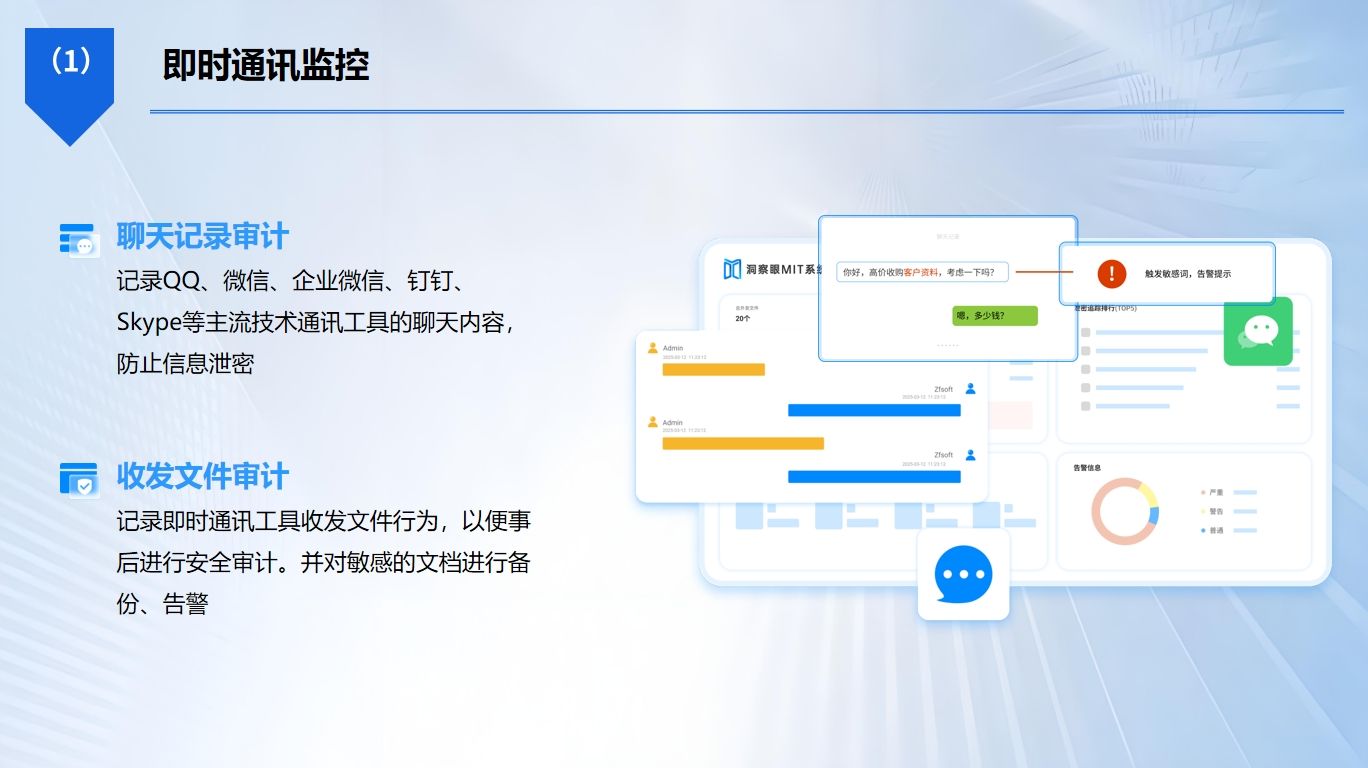
Chat monitoring: Implement in-depth monitoring of mainstream chat software such as QQ and WeChat, record chat content, time, and objects, and provide an immediate warning once sensitive information transmission is detected.
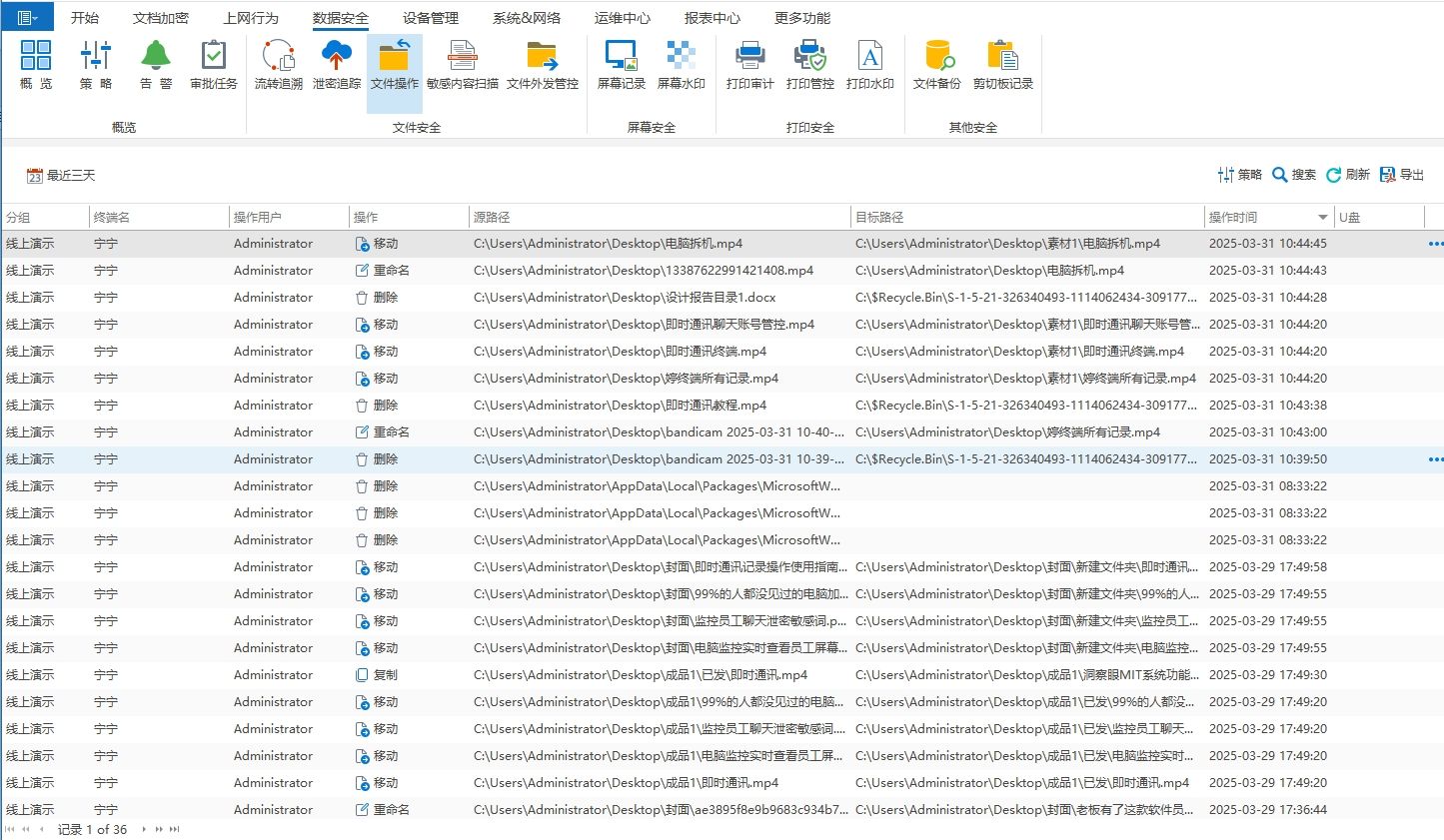
File operation monitoring: Record file operations, including file creation, modification, deletion, copy, move and other operations, as well as the file path and name of the operation.
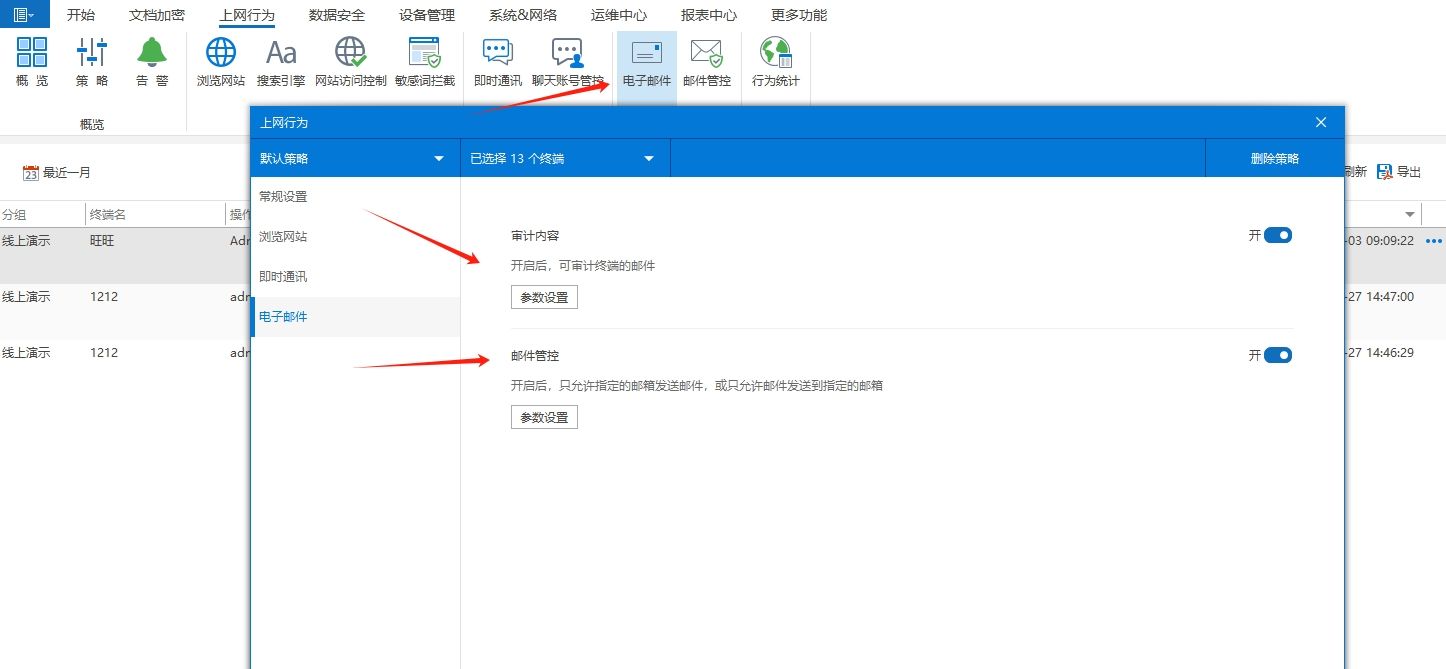
Email management and control: Comprehensive monitoring of employee email sending and receiving, recording key information such as email subject, text, attachments, sending and receiving time, and objects, effectively preventing employees from leaking sensitive information through email. Managers can check important business emails at any time, keep abreast of business progress, and provide strong support for corporate decision-making.
limitation
When the system is deployed and used, it has certain requirements for the enterprise's hardware equipment and network environment. If the configuration is insufficient, the monitoring effect may be affected. The software has complex functions, and companies need to invest a certain amount of time and energy in learning and configuration when using it for the first time.
2. Use ARP firewall for protection and monitoring
Function
ARP firewall can effectively monitor ARP attacks within the LAN and prevent network interruption and data leakage caused by ARP spoofing by binding IP and MAC addresses.
It can monitor ARP packets in the network in real time. Once an abnormal ARP request or response is found, it will immediately issue an alarm and automatically take defensive measures, such as intercepting illegal ARP packets, to ensure the stability of the network connection.
At the same time, the ARP firewall can display a list of correspondences between IP and MAC addresses of devices in the LAN, helping managers understand the connection status of network devices and discover illegal access devices in a timely manner.
limitation
ARP firewall mainly focuses on ARP attack protection. It has limited protection and monitoring capabilities for other types of network attacks, such as DDoS attacks, virus intrusions, etc.
Moreover, it can only monitor network activities related to the ARP protocol, and cannot comprehensively monitor file transfers and user operating behaviors within the LAN, and the monitoring scope is narrow.
In a complex network environment, misjudgments or omissions may occur, affecting the accuracy of monitoring.

3. Use the Group Policy function that comes with the Windows system
Function
The Group Policy function of Windows systems allows administrators to centrally manage and configure Windows devices within the LAN.
Through group policies, users can restrict users' use of specific software, prohibit access to certain websites, and control the use permissions of USB devices, thereby regulating users' operating behaviors within the local area network.
You can also set system security policies, such as password policies, account lock policies, etc., to enhance system security.
In addition, Group Policy can be used to deploy software updates, configure network settings, realize unified management of Windows devices within the LAN, and improve management efficiency.
limitation
The Group Policy function is only applicable to Windows system devices, and cannot be effectively managed and monitored for other operating systems in the LAN, such as Mac, Linux, etc.
Its function settings are relatively complex and require administrators to have certain knowledge of Windows systems and experience in group policy configuration. Otherwise, configuration errors are prone to occur and affect normal use of users.
Moreover, the monitoring and management functions of Group Policy are relatively basic, and it is difficult to meet some advanced monitoring requirements, such as real-time screen monitoring, in-depth data security protection, etc.

4. Use the open source tool Nagios for network monitoring
Function
Nagios is a powerful open source network monitoring tool that can comprehensively monitor servers, network devices, services, etc. within the local area network.
It can monitor the device's CPU usage, memory usage, disk space and other performance indicators in real time, as well as the running status of network services, such as Web services, database services, etc.
When a monitored object experiences abnormal performance or service interruption, Nagios can send timely alerts through multiple methods such as email and SMS, allowing administrators to quickly locate and solve problems.
At the same time, it supports custom monitoring plug-ins. Users can expand monitoring functions according to their own needs, and is suitable for LAN monitoring scenarios of different sizes and needs.
limitation
The deployment and configuration process of Nagios is relatively complex and requires a certain technical foundation, making it difficult for non-professional network managers to get started.
Although custom plug-in extension functions are supported, the development and maintenance of plug-ins require certain technical capabilities and time costs.
Moreover, Nagios mainly focuses on performance monitoring of network equipment and services. It has weak monitoring capabilities for user operating behaviors and file transfers within the LAN, and cannot provide a comprehensive LAN monitoring solution.
5. Adopt network access control system (NAC)
Function
Network Admission Control (NAC) can strictly control device access to the LAN.
When a device is connected to the LAN, NAC will authenticate the device. Only devices that pass authentication can access the network, effectively preventing illegal device intrusion.
At the same time, it will check the security status of the device, such as whether anti-virus software is installed, whether system patches are updated, etc. Devices that do not meet security requirements will be restricted from access or isolated to ensure the security of the network environment within the LAN.
In addition, NAC can allocate different network access rights based on user identity and device type to achieve refined network management.
limitation
The NAC system mainly focuses on device access control and security status inspection. For devices that have been connected to the network, it has limited capabilities in monitoring their specific operating behaviors and data transmission.
Deploying a NAC system requires certain adjustments and configurations to the existing network architecture, and the implementation costs are high, including hardware equipment procurement, software deployment, and technical personnel allocation.
Moreover, the compatibility of the NAC system is also a problem. It needs to be adapted to various network devices, operating systems and applications in the local area network. Otherwise, compatibility issues may occur and affect the normal operation of the system.

The above five LAN monitoring methods each have their own advantages and disadvantages. Enterprises and organizations can flexibly choose or use these methods in combination according to their actual needs, technical capabilities, and budgets to build a LAN monitoring system that suits them and ensure the safe and stable operation of the LAN.
Editor: Reiko


 Insight Eye MIT System


 Hebei Public Network Security No. 13019902001038
