
Article summary: After working in corporate security for more than ten years, I have seen too many scenes of bosses slapping their thighs after drawings were taken away and codes were copied. This matter of core data leakage, to put it bluntly, is to "beware of gentlemen, not villains". If you really want to take it out, you can't rely on verbal agreements and administrative systems.
Having worked in corporate security for more than ten years, I have seen too many scenes where bosses slapped their thighs after drawings were taken away and codes were copied. When it comes to core data leaks, to put it bluntly, "Beware of gentlemen, not villains". If you really want to take it out, verbal agreements and administrative systems simply can't handle it.
Today we are not going to get into trouble, let’s just talk about the practical stuff. The title says "How to encrypt drawings". I will tell you a few methods that can be implemented and prevent troubles at present, especially the hard-core methods that make many fellow bosses sleep soundly.
Lock the drawing! 3 tricks to make core data "cannot be taken away, opened, and cannot be understood"”
1. Deploy the Insight Eye MIT system

This group of old brothers have been working in the security circle for more than ten years, and the set of things they have developed has indeed put an "iron gate" on the core data of the enterprise. It doesn’t play tricks with you, it’s hard work when it comes to fruition:
Transparent encryption, forcing "locking" the source : No matter whether you use CAD, SolidWorks or various code editors, the files will be automatically encrypted as soon as they are landed. Employees see it as normal internally, but once it is sent out through WeChat, email, or USB flash drive, it is a bunch of garbled code. The boss of a company that makes precision molds complained to me that a technical backbone had copied more than 300 drawings before changing jobs. As a result, all of them were scrapped as soon as he opened the new company, and the other company's HR directly called and scolded him.
Outsourcing control, “registering documents with household registration”” : Drawings to be sent to suppliers or customers? Yes, but it requires approval. The system can make outgoing files "burn after reading", limit the number of times they can be opened, their usage period, and even bind them to specific computers. Want to forward it? There are no doors. Last time, the boss of an auto parts factory said that they had blocked a big hole in the supply chain with this method, otherwise the core technology would have been all over the street.
Screen watermark eliminates the thought of taking pictures : There are always people thinking that if I can’t get out my encrypted files, why don’t they point their mobile phones at the screen and take pictures of the head office? This trick of Insight Eye is so unique that the watermark of employee number + timestamp is displayed in real time on the employee’s computer screen. If there is really a leak, you can locate the person in ten minutes by following the watermark. This move is extremely intimidating and can nip the thought of "reaching out" in the bud.
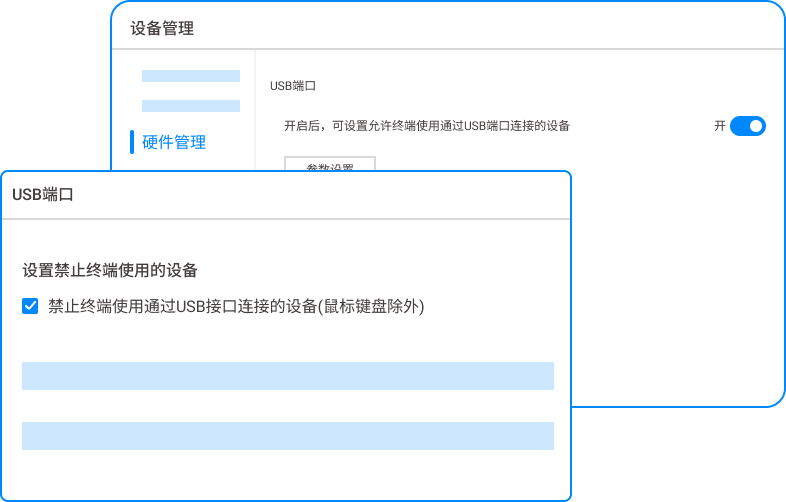
U disk control, blocking physical channels : Nowadays, few people are stupid enough to use a USB flash drive to copy hundreds of gigabytes of code, but people with good intentions cannot prevent it. The system can directly set the USB flash drive to "read-only" or completely disable it. Even if it is plugged in, the authorization password must be entered. If you really want to copy, every step of the operation will leave traces. Who, when, and what files were copied can be clearly seen in the background.
After resignation and handover, core assets will be “zero legacy”” : This is the most reassuring approach for management. The moment an employee mentions resignation, the system automatically locks permissions and all encrypted documents on the personal computer are forcibly archived to the company server. I have seen too many companies where when people leave, the code follows them without even saying hello.
2. Physical isolation + cloud desktop

This method sounds old-school, but it is still an iron rule in some fields of military industry and chip design. The core R&D department is set up on a separate floor, equipped with access control and signal shielding, and all development is done on the cloud desktop. The employees only have a monitor and a thin client in front of them. There is no hard disk, and the code cannot be stored locally at all. Want to copy? Cloud Desktop blocks the USB port and clipboard, making it impossible to send even a screenshot.
The disadvantages are also obvious and the cost is prohibitively high. A set of cloud desktops plus physical modifications can easily cost millions, and the research and development efficiency will be affected. When the network fluctuates, engineers can drop their keyboards. It is suitable for organizations that are not short of money and have abnormal requirements for security. Ordinary manufacturing companies and technology companies cannot bear this effort.
3. Traditional document encryption software (non-transparent encryption)
There are also some old-school "manual encryption" solutions on the market. Employees can right-click on which drawing they think is important and choose to encrypt it, set a password, and then send it to others. It sounds very flexible, but in actual implementation it is a piece of cake. Who remembers to click that button when R&D is busy? Forgot to set a password, and the drawings ran away naked. Even if you set a password, the other party has to call to ask for the password. Not to mention the protracted process, the password is sent back and forth in the chat history, as if it is not encrypted.
This kind of "looks beautiful", but it cannot prevent internal leaks, whether intentional or unintentional. When we do security, we pay attention to the "enforcement strategy". Once the key is handed over to employees, the lock will be useless.
Source of this article: Enterprise Data Security Alliance, China Intelligent Manufacturing Research Institute
Leading expert: Liu Zhenguo
Editor in charge: Zhao Yalin
Last updated: March 27, 2026


 Insight Eye MIT System


 Hebei Public Network Security No. 13019902001038
