
Official announcement: Check the official website and be wary of counterfeiting and fraud check the details
front page > dynamic center > Technical articles  >  text

Want to monitor company computers? Six company computer screen monitoring software recommendations in 2025, recommended for collection

2025-06-09 16:48:57

Article summary: Mr. Li stared at the employees in the office area, frowned, turned around and asked Xiao Wang, the IT director next to him: "Recently, the project progress has been lagging behind, and the employees' working conditions are not quite right. Is there any way to effectively manage it?" ”Xiao Wang thought for a moment and replied: "Maybe

Mr. Li stared at the employees in the office area, frowned, turned around and asked Xiao Wang, the IT director next to him: “Recently, project progress has been lagging behind, and employees' working conditions are not quite right. Is there any way to effectively manage it? ”

Xiao Wang thought for a moment and replied: “Maybe you can try computer monitoring software. Many companies now use it to optimize management and ensure data security. ”

In today's fiercely competitive business environment, companies have increasing demands for refined internal management. Improving employee work efficiency and protecting business secrets are both crucial.

Computer screen monitoring software is becoming a powerful assistant for enterprises to solve these problems.

In 2025, many excellent corporate computer screen monitoring software will emerge on the market. Here are six practical tools recommended for you.


Want to monitor company computers? Six company computer screen monitoring software recommendations in 2025, recommended for collection (Figure 1)


1. Insight Eye MIT System

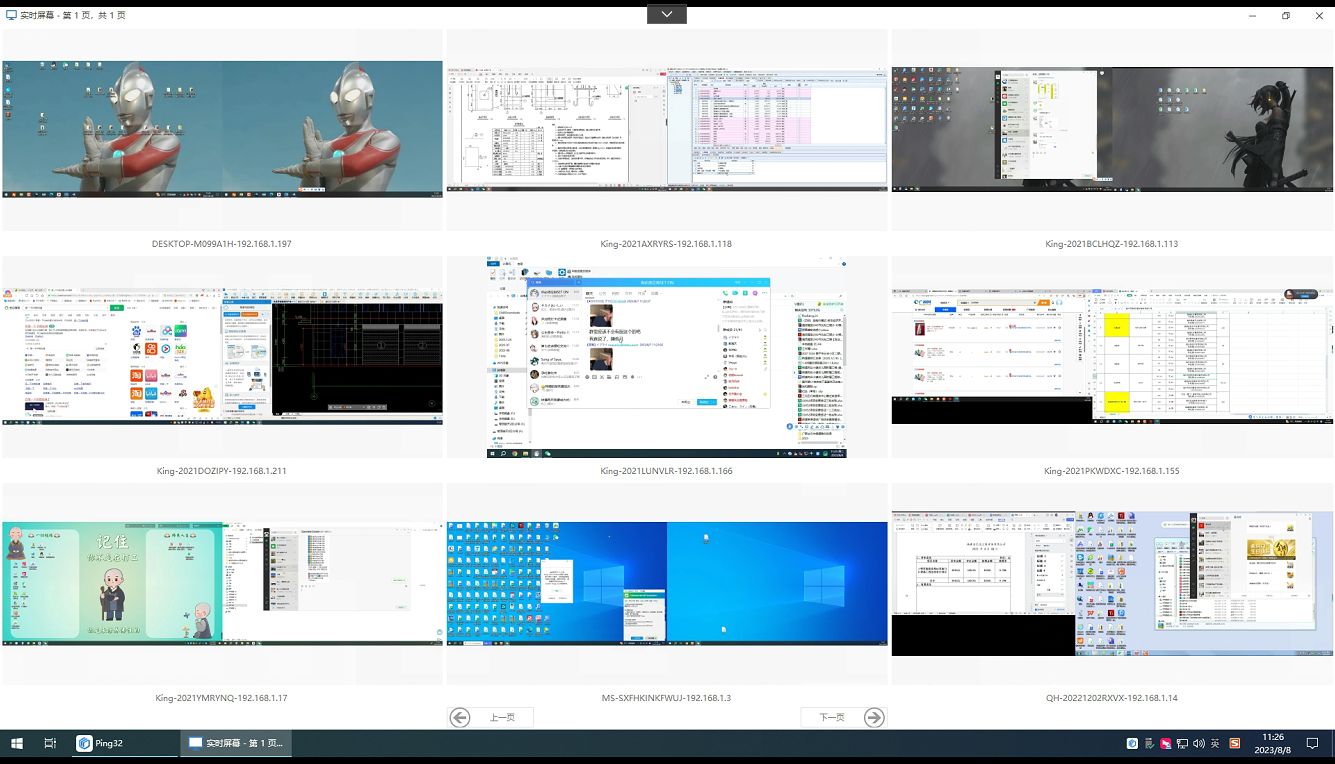
Real-time screen monitoring

With excellent high-definition image quality and smooth performance, it provides managers with real-time representation of employees' computer screens. Single-screen viewing allows you to grasp all details, and multiple screens can be displayed at the same time, making it easy to manage large-scale team management.

Want to monitor company computers? Six company computer screen monitoring software recommendations in 2025, recommended for collection (Figure 2)


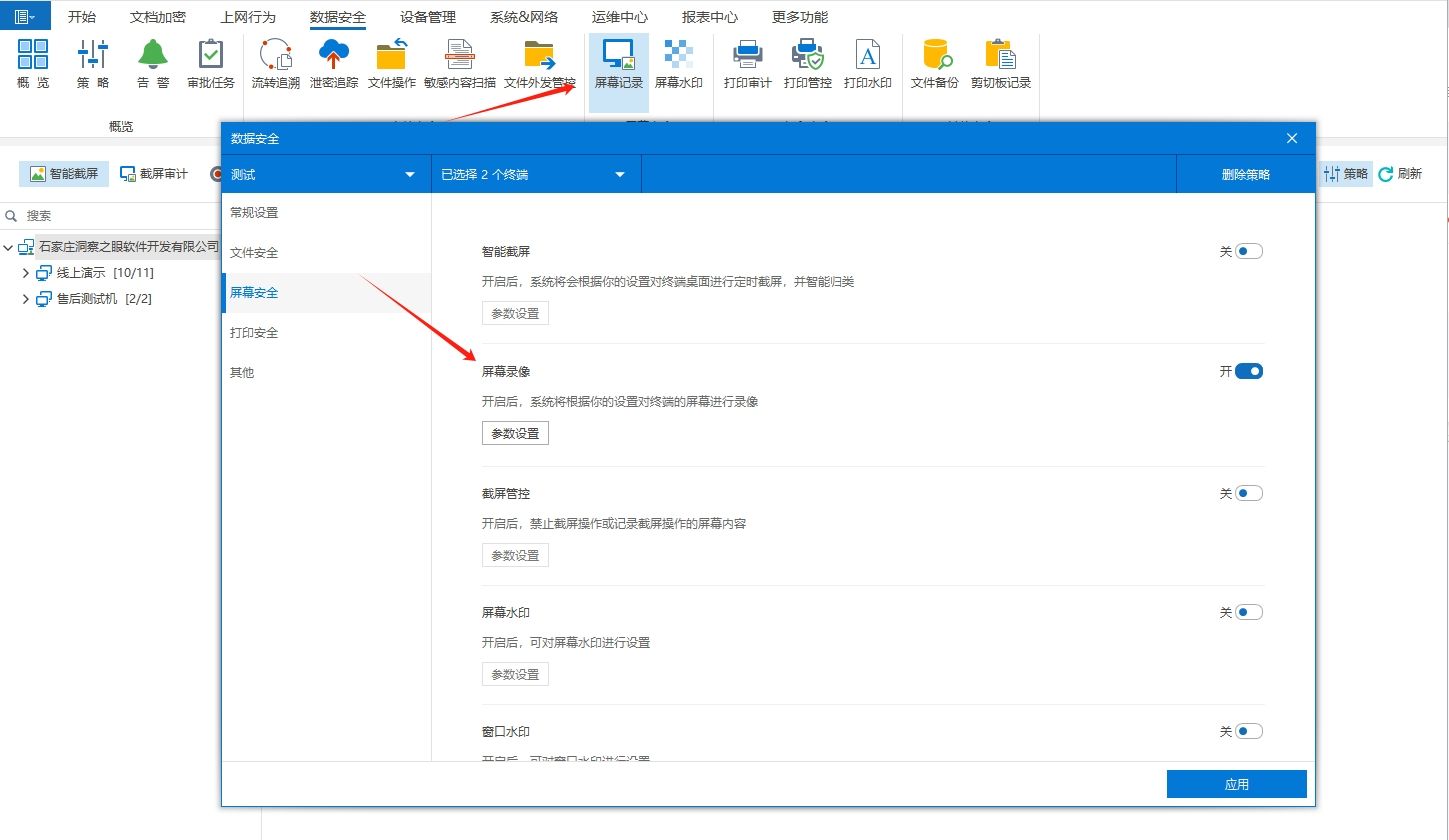
Screen dynamic traceback

Not only does it support real-time high-definition monitoring, but it can also play back screen recordings according to the timeline to quickly locate key operating nodes. For example, when an employee accidentally deletes an important file, the operation track can be traced back to recover the data.

Want to monitor company computers? Six company computer screen monitoring software recommendations in 2025, recommended for collection (Figure 3)


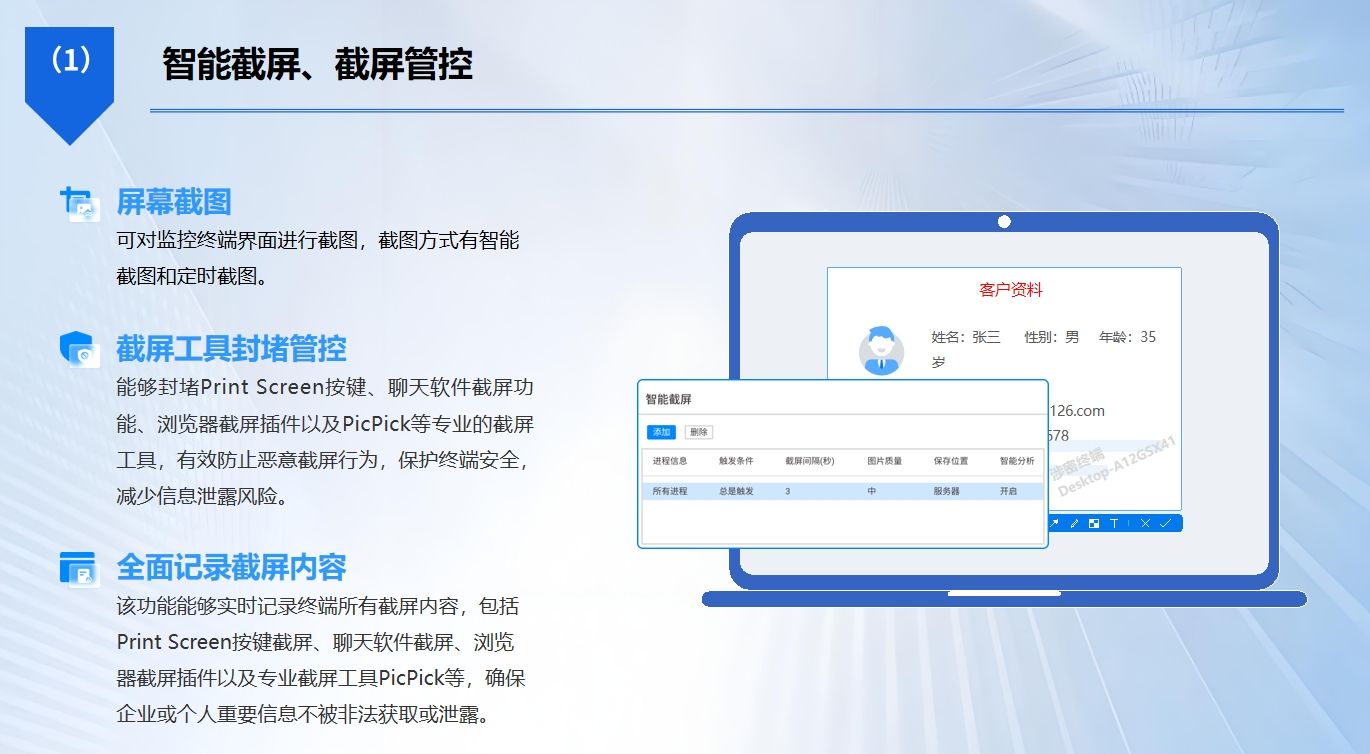
Smart screenshot

Capture key operating moments based on set rules; Scheduled screenshots are like a time recorder, which saves screen images at preset intervals, making it easy to review the entire work process of employees and making their work status clear at a glance.

Want to monitor company computers? Six company computer screen monitoring software recommendations in 2025, recommended for collection (Figure 4)


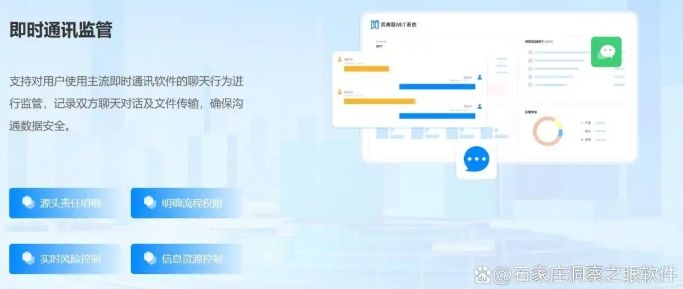
Communication record monitoring

In-depth coverage of mainstream communication software such as WeChat, QQ, DingTalk, and Skype, with no missing information such as chat content, time, and objects. It can also flexibly customize the sensitive vocabulary library. Once a sensitive word is triggered in employee communication, the system will instantly issue an early warning.

Want to monitor company computers? Six company computer screen monitoring software recommendations in 2025, recommended for collection (Figure 5)


File operation monitoring

Strictly control the entire life cycle of files, and actions such as opening, editing, saving, copying, pasting, and sending are all accurately recorded.
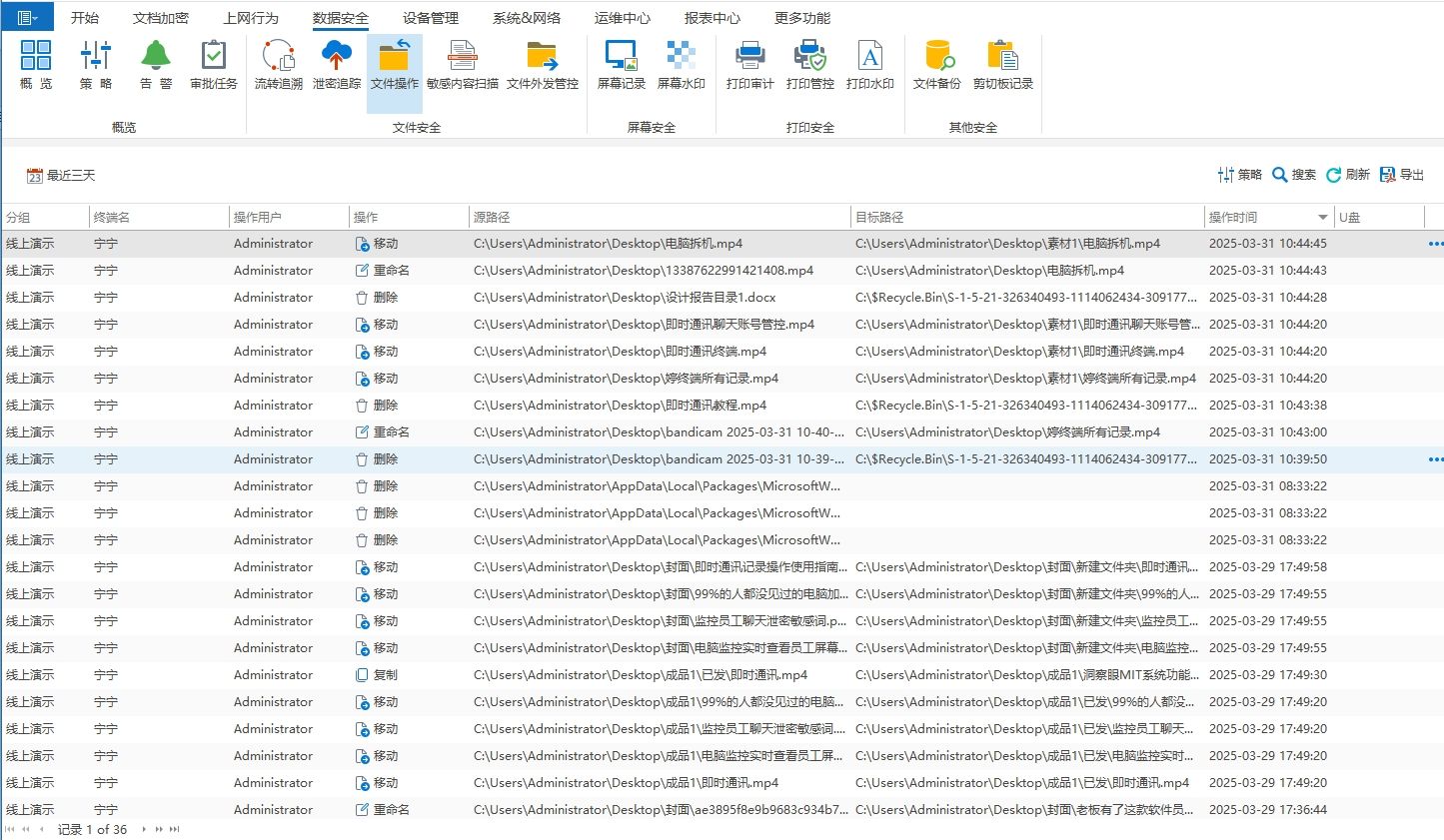

Want to monitor company computers? Six company computer screen monitoring software recommendations in 2025, recommended for collection (Figure 6)


2. Teramind

It focuses on data security and employee behavior insights, with significant advantages.

Live screen recording: Completely record employee computer operation procedures to provide detailed material for subsequent review and review, allowing companies to deeply analyze employee work behavior and explore potential problems and optimization space.

Deep behavioral analysis: With the help of in-depth exploration of keylog records and application usage, we can accurately outline employee working habits and behavioral patterns. Based on this, enterprises can formulate personalized management strategies and improve management efficiency.

Smart Alert System: It has keen risk perception capabilities. Once it detects abnormal behaviors such as downloading a large number of sensitive files or frequently visiting dangerous websites, it will instantly send alerts to managers to help enterprises respond quickly and nip potential risks in the bud. It is especially suitable for large and medium-sized enterprises with strict information security requirements.


3. ActivTrak

It brings precise insights into the computer usage management of corporate employees.

App and web usage tracking: Accurately record employee application usage time, clearly distinguish office and entertainment software time-consuming, record web browsing records in detail, and conduct in-depth analysis of page content and work relevance. Through these detailed data, companies can accurately assess employee work engagement.

Productivity report generation: Integrate employee computer usage data to generate comprehensive and intuitive behavioral analysis reports. With the help of reports, enterprises can quickly locate work efficiency bottlenecks, optimize work processes in a targeted manner, and comprehensively improve overall productivity. They are a powerful assistant for enterprises to improve the refinement of management.


Want to monitor company computers? Six company computer screen monitoring software recommendations in 2025, recommended for collection (Figure 7)


4. Warnage Dntral

Real-time monitoring of employee computers: Clearly present employee computer operation dynamics to help companies understand employees' work status in a timely manner and ensure that work is progressing in an orderly manner.

asset Management: Comprehensively sort out the enterprise's hardware assets, and control the quantity, status, location and other information to achieve visual asset management and reduce the risk of asset loss.

Software deployment: Supports batch software installation, greatly saving software deployment time and labor costs, and improving enterprise software update and management efficiency.

Patch management: Automatically detect and timely update system and software patches, effectively repair security vulnerabilities, ensure safe and stable operation of corporate networks and equipment, and safeguard corporate digital operations.


5. Veriato 360

Screen and file operation monitoring: Real-time screen monitoring allows managers to keep track of employees' work screens at any time, and file operation records record creation, deletion, modification, movement and other behaviors in detail, providing double protection for corporate data security.

Powerful data analysis: Use advanced algorithms to deeply mine employee operation data and quickly identify potential security risks and internal fraud. Through visual analysis reports, complex data can be understood at a glance, helping enterprises to prevent data security crises in advance.


6. Netop Vision Pro

Cross-platform support: It is perfectly compatible with Windows, Mac, Linux and other multi-system computers, breaking system barriers and realizing unified monitoring and management of enterprise equipment, especially suitable for multi-system office environments.

Multi-screen real-time monitoring: It can monitor multiple computer screens at the same time, allowing enterprises to centrally manage and control different system equipment, greatly improving management efficiency. In remote teaching, technical support, remote office management and other scenarios, it effectively breaks geographical restrictions and promotes efficient collaboration.


Want to monitor company computers? Six company computer screen monitoring software recommendations in 2025, recommended for collection (Figure 8)


Editor: Reiko


Previous article : Want to prevent your computer from installing software? Teach you four methods to prohibit the installation of new software, there is always one suitable for you!
  • Related recommendations
  • The boss must hide it! Recommended 3 super practical computer screen monitoring software in 2026

    Many managers have experienced this darkest moment: the day after the core salesperson resigned, a competitor quoted a cut-off price that was 1% lower than your base price. ; Or the design drawings that cost a lot of money to develop appear inexplicably in a certain treasure's library of cheap materials. You check

    2026-01-16 14:19:43
  • How to monitor computer screen in real time? Seven recommended computer screen monitoring software, 25 must-haves

    Nowadays, digital office and multi-device collaboration have become the norm, and real-time monitoring of computer screens has gradually become a necessity: companies need to build a strong defense line for data security and control team work progress, parents want to guide their children to use the Internet healthily, and IT personnel need to conduct remote and quick troubleshooting

  • Want to monitor your computer? 6 recommended computer screen monitoring software in 2025!

    Computers have become an indispensable office tool in businesses and organizations. However, as computers are used more and more frequently, managing and monitoring computer activity has become critical. Whether it's to improve employee productivity, protect corporate data security, or ensure

  • Recommended practical computer monitoring software: six recommended computer screen monitoring software

    Today, as digital offices become increasingly popular, computer screen monitoring software has become an important tool for enterprises to improve management efficiency and ensure data security. The following are six carefully selected practical computer monitoring software, each with its own characteristics and powerful functions, which can help enterprises achieve comprehensive screen monitoring, behavior analysis and data protection. Whether it's improving work efficiency or preventing data leaks, these software can protect your business. 1. Functional features of Insight Eye MIT system: ①Real-time monitoring:...

    2024-10-10 15:03:52
  • What software are there to monitor computers? Recommended corporate computer screen monitoring software

    What software are there to monitor computers? Recommended Enterprise Computer Screen Monitoring Software With the rapid development of information technology, computers have become an indispensable tool for daily operations of enterprises. However, with this comes concerns about employee computer use and management challenges. In order to better understand the working status of employees, prevent information leakage, and improve work efficiency, bosses are increasingly inclined to use computer monitoring software. Download and use Insight Eye software https://www.dongchayan.c...

    2024-05-17 11:58:23
  • Three excellent domestic computer screen monitoring software recommendations

    Three Excellent Domestic Computer Screen Monitoring Software Recommendations With the development of enterprise informatization, computer screen monitoring software plays an increasingly important role in enterprise management. They can not only help companies improve employee productivity, but also ensure corporate information security. Among the many domestic computer screen monitoring software, Insight Software, Network Control System and Data Umbrella Software are highly recommended for their excellent performance and stable performance. Download and use Insight Eye software https://www....

    2024-05-17 11:57:58
  • Which computer screen monitor is better? Recommended computer screen monitoring software

    Which computer screen monitor is better? Recommended computer screen monitoring software With the development of technology, the demand for computer screen monitoring software is gradually increasing. Whether it is used for home education, business management or personal efficiency improvement, choosing a suitable screen monitoring software is crucial. This article will recommend you an excellent screen monitoring software - Insight Eye Software. Download and use Insight Eye software http://www.dongchayan.com Insight Eye software is an advanced...

    2024-03-02 14:43:07
  • What are the software for real-time monitoring of computer screens? | Recommended ranking of computer screen monitoring software

    Computer screen monitoring software is a software that can remotely view and control the screen of the monitored computer. It is usually used in business management, education and training, home monitoring and other scenarios. Computer screen monitoring software can help monitors understand the computer usage of the monitored person, improve work efficiency, prevent data leakage, and protect information security. There are many computer screen monitoring software on the market. This article will recommend you 10 computer screen monitoring software that are real and easy to use. 1. Insight Eye MIT System: Hole...

    2024-03-02 13:54:28
  • Which computer screen monitor is better? Recommended computer screen monitoring software

    Which computer screen monitor is better? Recommended computer screen monitoring software With the development of technology, the demand for computer screen monitoring software is gradually increasing. Whether it is used for home education, business management or personal efficiency improvement, choosing a suitable screen monitoring software is crucial. This article will recommend you an excellent screen monitoring software - Insight Eye Software. Insight Eye Software is an advanced computer screen monitoring software designed to provide enterprises with comprehensive and efficient employee computer usage monitoring and management solutions...

  • Computer screen monitoring software: 5 useful computer screen monitoring software recommendations

    Computer screen monitoring software: 5 useful computer screen monitoring software recommendations In today’s digital age, computers have become an indispensable part of work. However, the risks that come with it are increasing. Problems such as cyber attacks, virus infections, data leaks, employee fraud, and unauthorized access pose huge threats to companies. In order to protect the security of company data, it is crucial to choose an easy-to-use computer monitoring software. Computer screen monitoring software is a software that can monitor the computer screen in real time...

    2023-12-11 21:48:23

Words everyone is searching for:

Scan WeChat to contact the pre-sales engineer

